APRS (Automatic Packet Reporting System) represents one of amateur radio’s most elegant solutions to a fundamental problem: how do you send and receive text-based messages when you can’t rely on cell towers or the internet? Whether you’re in the backcountry, responding to a disaster, or just exploring what’s possible with RF-based digital communication, understanding the different APRS messaging methodologies gives you real communication flexibility.
This guide covers the four primary approaches for transmitting and receiving APRS messages, each with distinct characteristics and use cases. I’m assuming you’ve already got APRS configured on your radio—if you’re looking for step-by-step setup instructions for a specific rig, your manual’s the best resource. What we’re focusing on here is the message protocol itself: how messages are formatted, routed, and delivered.
Quick Note on Format Notation
Throughout this guide, you’ll see text in angle brackets like <Call Sign> or <Message>. These are placeholders—you substitute your actual data. They’re not literal characters you transmit.
Direct Radio-to-Radio APRS Messaging
This is the most straightforward approach: your radio sends an APRS message directly to another station via RF propagation on 144.390 MHz (in North America). It’s elegant in its simplicity—and therein lies its limitation.
The catch is real: the recipient needs to be actively monitoring APRS on the frequency at the exact moment your message arrives. If they’re not listening? The message vanishes. No delivery confirmation. No store-and-forward. It’s like calling out across a crowded room and hoping the other person hears you.
Format
TO: <Call Sign>-<SSID>
MSG: <Message Text>
The SSID (Secondary Station Identifier) is that 0-15 suffix that lets one call sign operate multiple APRS stations. Common conventions include -7 for handhelds, -9 for mobiles, though people use whatever they want, so there’s plenty of guessing involved.
Messages are limited to 67 characters—a constraint from APRS’s 1980s origins when memory was precious.
Example
TO: KD8BXY-9
MSG: Arrived safely at the camp, no cell service.
The trade-off here is simplicity versus reliability. It works perfectly when both parties are monitoring. It’s useless when they’re not.
Server-Based APRS Messaging (The Reliable Method)
This is where APRS gets genuinely useful for real-world communication. Instead of hoping someone’s monitoring, you use APRS-IS (APRS Internet Service)—a global network of servers that provide store-and-forward capability. Think of it as voicemail for packet radio, except it actually works.
When you send a message using this method, it gets stored on an APRS server running 24/7. The recipient doesn’t need to be on the air. You don’t need simultaneous RF connectivity. Messages just sit there waiting for retrieval.
Sending Messages via the MAIL Gateway
TO: MAIL
MSG: @<Call Sign>-<SSID> <Message Text>
Notice the @ symbol—that’s critical. It tells the server this message is for a specific person. Without it, your message goes nowhere, and you’ll spend the next hour troubleshooting before realizing you forgot one character.
How It Works
When you transmit this message format:
- Your radio encapsulates it in an AX.25 frame
- Local digipeaters relay it across the RF network
- An Internet Gateway (IGate) receives it and forwards to APRS-IS
- The server parses the destination and stores the message
- Messages stay queued for about 30 days before expiring
Example
TO: MAIL
MSG: @KA8OAD-7 The node is offline—can you check it?
The message waits until KA8OAD-7 requests retrieval. It’s reliable, it’s asynchronous, and it actually works when real-world communication matters.
Retrieving Your Messages
To check messages stored on the server:
TO: MAIL
MSG: APRSM
That’s it. Four letters. The server returns all your queued messages when it receives this request.
SMS Gateway Messaging
Some areas have APRS-to-SMS gateways that bridge packet radio and text messaging. This lets you send APRS messages that arrive as text messages on someone’s phone.
Format
TO: SMSGTE
MSG: +1-### ###-#### <Message Text>
The recipient’s phone number in standard North American format (country code, area code, number). The message itself is limited to whatever SMS allows.
Example
TO: SMSGTE
MSG: +1-720-555-1234 Running late, ETA 20 minutes.
The technical flow routes your message through an APRS-IS gateway that connects to SMS infrastructure. It’s useful when you need to reach someone not monitoring APRS but who has a cell phone.
The limitation: gateway availability varies by region. If your area doesn’t have a gateway, this won’t work.
Email Gateway Messaging
You can send APRS messages that arrive as emails. This bridges the gap between RF-based communication and modern email infrastructure.
Format
TO: EMAIL
MSG: user@domain.com <Message Text>
Note there’s no @ prefix before the email address here (unlike the MAIL format). The address must be fully qualified with the domain.
Example
TO: EMAIL
MSG: kcunning@gmail.com Arrived safely at the field location.
Your message gets delivered as an email from your call sign at an APRS gateway domain. The recipient receives it in their inbox.
Practical Consideration
APRS-to-email messages sometimes land in spam folders because email servers see them coming from unusual domains through third-party gateways. If this happens, add the APRS gateway address to your contacts to train your spam filter.
Important: Email recipients can’t reply to these messages. The return address is non-monitored. If two-way communication matters, use a different method or include alternative contact info in your message.
Automatic Message Notifications
Instead of repeatedly checking for messages, you can enable automatic notifications when new messages arrive.
How to Enable
Include APMAIL in your APRS position beacon comment field. The message server monitors beacons for this keyword and automatically notifies you when messages are waiting.
What Happens
- Your radio beacons periodically with
APMAILin the comment - The message server notes that you want notifications
- When new messages arrive for you, the server sends an automatic alert
- You retrieve your messages with the APRSM command
It’s a small feature that reduces unnecessary APRS traffic and keeps you aware of incoming communication without constant polling.
Why This Matters
APRS messaging isn’t the fastest or fanciest communication method. It won’t compete with Signal or WhatsApp for instant messaging. But it’s resilient, distributed, and independent of commercial infrastructure. When everything else fails—and eventually it will—APRS messaging still works.
These protocols represent decades of amateur radio innovation and practical engineering. They’re designed by people who understand that sometimes the most elegant technology is the one that actually works when you need it.
So set up your APRS station, understand these messaging options, and you’ll have a communication capability that doesn’t depend on cell towers, satellites, or anyone’s business model. That’s the value here.
Additional Resources
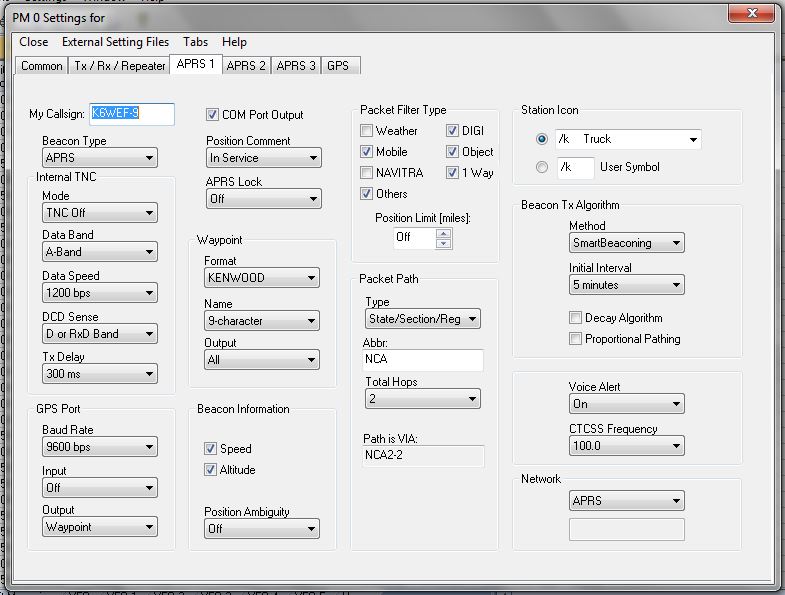
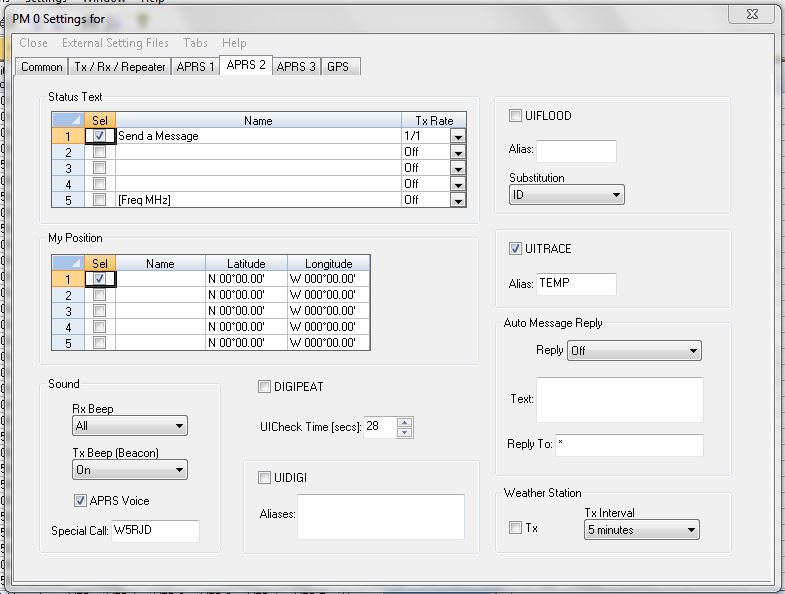
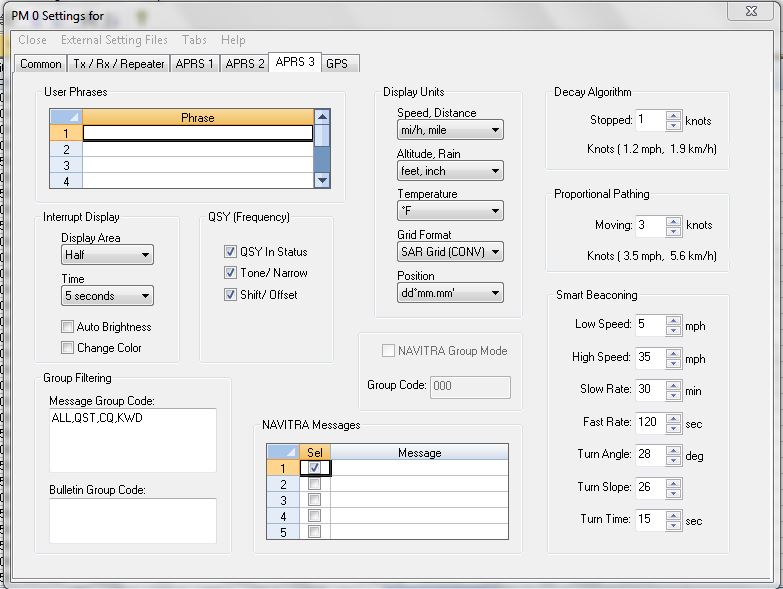
Special thanks to Butch, K6WEF, for the visual documentation that makes APRS configuration clear.
Kenwood D710 APRS Configuration Reference